First, the question everyone skips: why run AI on AWS at all, instead of just paying for an API and moving on? Then the five architectures once you do — what each actually involves, what each costs, and which situation each one fits.
KubeCube Engineering·4 August 2026·12 min read
Why not just buy an AI subscription and be done?
Worth answering before any diagram. A seat subscription like ChatGPT Plus or Claude Pro licenses a human to use a chat window. You cannot build a product feature on it, so it is not really in the running.
That leaves a direct vendor API key versus going through AWS. The direct key ships faster and for plenty of teams it stays the right answer. AWS earns its place when one of these applies:
IAM instead of a shared secret. A vendor key is a bearer token — whoever holds it can spend your money, and it ends up in a Slack thread or a contractor's .env. On Bedrock there is no key: an IAM role scoped to one action on one model, revoked by editing a policy.
Data stays in a boundary you control. Calls run in your account and Region. AWS states that model providers have no access to Bedrock logs or to customer prompts and completions. For a data-residency clause, this is often the whole reason.
One vendor, one bill, one audit trail. A second AI vendor means another security review, DPA, and invoice. Bedrock lands on the bill you already reconcile, with CloudTrail over the calls.
An exit that isn't a rewrite. If volume grows past the point where self-hosting is cheaper, you move from architecture 01 to 02 inside the same account and IAM model.
When a direct API key is the better call: internal tooling, prototypes, low volume, no data-residency clause, no compliance reviewer. AWS adds setup work and buys you little there. Revisit when the first enterprise security questionnaire arrives — that is usually when the calculus flips.
Past that decision, "AI infrastructure" still covers an enormous range. At one end is a single authenticated API call. At the other is a multi-node GPU cluster you patch, scale, and pay for by the hour whether or not anyone uses it. Five patterns cover most of what teams actually build on AWS. Each one below lists its components, what it costs, and the situation it fits.
Managed · Architecture 01
Amazon Bedrock: fully managed
You call an API. AWS holds the infrastructure, the GPUs and the model, and your team never sees a server. Start here if what you want is an AI feature in a product rather than AI infrastructure as a thing you operate.
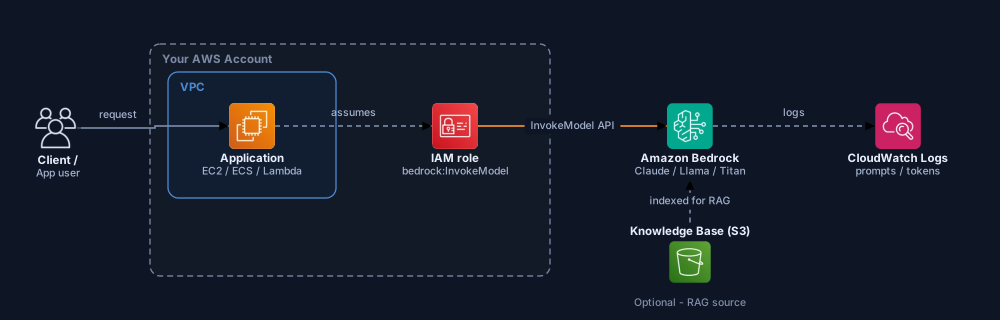
01 — Bedrock. Click to open full size
Cost shape
Billing modelPer token — input and output priced separately.
Frontier-class modelsOrder of a few dollars per million input tokens, and several times that for output.
Smaller / open modelsRoughly an order of magnitude cheaper per token.
Idle costNone. No traffic, no bill.
Scaling to zero is what matters early. No traffic, no GPU sitting idle on your bill. What you give up is any economy of scale: the ten-millionth token costs exactly what the first one did, forever.
Component reference
Application (EC2 / ECS / Lambda)
Your code, in your VPC. No API key sits in the codebase. The AWS SDK authenticates through an IAM role attached to the compute resource.
IAM role — bedrock:InvokeModel
A narrow permission scoped to the model you actually need. Without it, calls fail with AccessDenied. There are no shared global keys to leak.
Amazon Bedrock
A regional AWS service fronting Anthropic Claude, Meta Llama, Amazon Titan/Nova, Mistral and Cohere behind one API. Switching models is a parameter change, not an infrastructure change.
Knowledge Base documents (S3, RAG)
Optional. Documents in S3 are automatically chunked, embedded, and indexed. The model pulls them in as context at query time (retrieval-augmented generation).
CloudWatch Logs
Bedrock can log every call, including prompt, response and token count, for audit and monitoring. No custom code needed to ship that data yourself.
Reach for this when AI is one feature in your product rather than the thing you are building a team around. No GPU capacity planning, no serving layer to own. AWS also documents that model providers get no access to Bedrock logs or to customer prompts and completions, which answers a lot of data-residency questions without any of the work of self-hosting.
Self-hosted · Architecture 02
Self-hosted inference on EKS
Structurally this is a small local cluster, scaled up. Swap the lightweight test runtime for a real serving engine like vLLM or TGI, put it on real GPU nodes, and you have it. You pick the model and tune the serving layer. You also pay for the GPU by the hour whether traffic arrives or not, which is the part that decides whether this is a good idea.
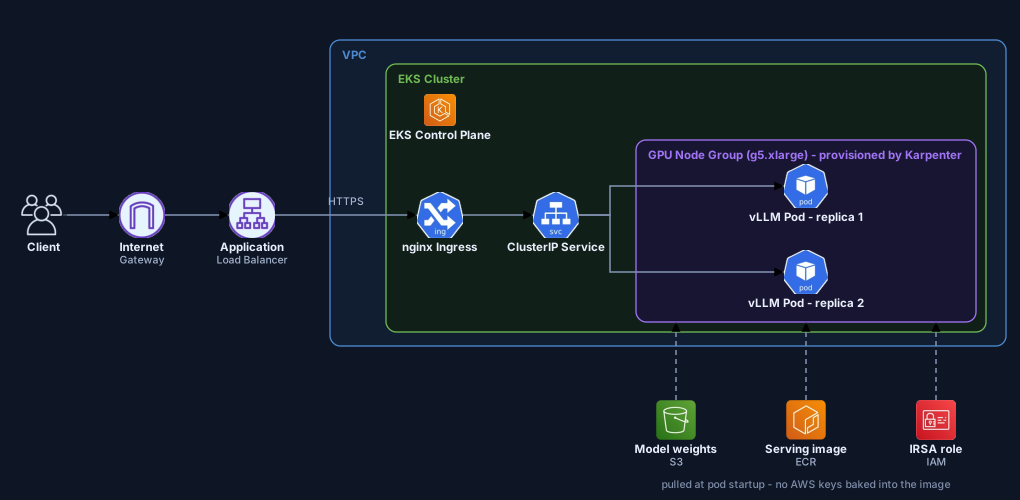
02 — Self-hosted inference on EKS. Click to open full size
Cost shape
Billing modelPer GPU-hour, whether or not a request arrives.
Entry-level GPU nodeA single g5.xlarge (one A10G) is on the order of $1/hour on demand — roughly $700–750 a month if it runs continuously.
Committed useA one-year commitment typically takes 30–40% off that rate.
Also on the billEKS control plane, load balancer, NAT gateway, S3, plus a second replica if you want redundancy.
Utilization decides this, not the hourly rate. A GPU you keep busy beats any API on cost per token. Run that same GPU at 10% and your real cost per token is ten times the sticker price. Nothing about the invoice tells you which situation you are in.
So do the arithmetic both ways before committing. Take a month of token volume, price it on Bedrock, and set that against the fixed monthly cost of a node large enough to carry your peak. Below a few tens of millions of frontier-class tokens a month, the managed API usually wins outright.
Component reference
Internet Gateway
The VPC component that allows traffic to and from the public internet. Without it the VPC is fully isolated.
Application Load Balancer
Provisioned automatically when a Kubernetes Service of type LoadBalancer goes up behind an ingress controller. The same mechanism as in a local dev cluster, now serving production traffic.
EKS control plane
The managed API server, etcd, and scheduler. The layer AWS runs for you. Your team owns everything below it (the nodes) and above it (the workloads).
GPU node group (g5.xlarge) + Karpenter
The actual GPU-backed EC2 instances where pods run. Karpenter watches for unschedulable pods and provisions the right instance type on demand, rather than relying on a static, pre-sized node group.
nginx Ingress
Host- and path-based routing. The same controller used locally, unchanged in principle at production scale.
ClusterIP Service
A stable internal DNS name that load-balances across pod replicas.
vLLM pods (replicas)
The actual inference server process. vLLM (or TGI, or Triton) serves the model over HTTP with batching and KV-cache optimizations a lightweight test runtime doesn't have.
Model weights (S3)
Trained model files (safetensors/GGUF), pulled at pod startup. The same pull-on-start pattern as a local runtime, sourced from S3 instead of a public registry.
Serving image (vLLM, ECR)
A container image in your own private registry (ECR), rather than a public image pulled straight from Docker Hub.
IRSA role
IAM Roles for Service Accounts. An IAM role bound directly to a Kubernetes ServiceAccount. The pod reads from S3 with no AWS key embedded in code or image anywhere.
Worth it when volume is high and sustained enough that per-token cost starts to dominate the budget. Also when you need a fine-tuned model no managed API offers, or when data-residency rules are strict enough that even Bedrock will not clear them.
Self-hosted · Architecture 03
Distributed training on EKS
The most expensive and most complex thing on this list: training your own model, or running a large fine-tune, across several GPU nodes at once. Something counterintuitive happens at this scale. The bottleneck stops being compute and becomes the network between the nodes.
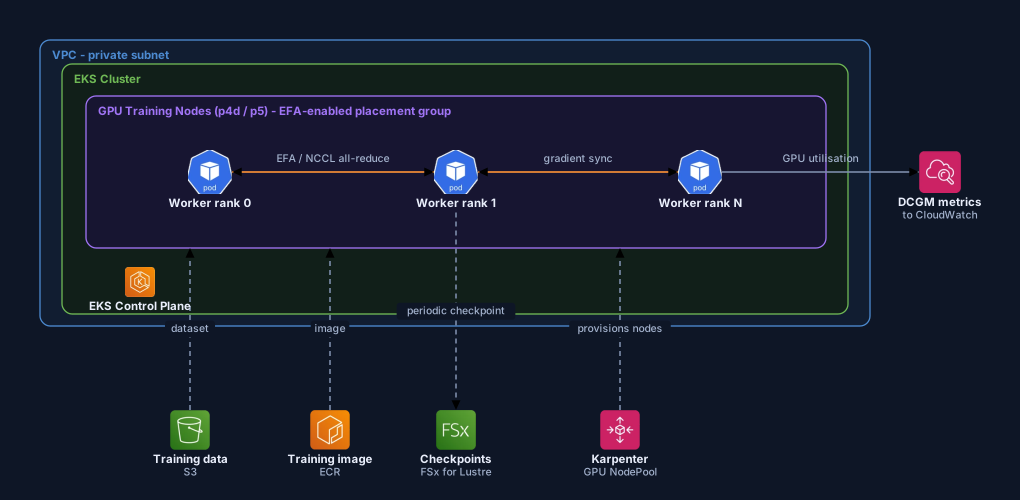
03 — Distributed training on EKS. Click to open full size
Cost shape
Billing modelPer GPU-hour across every node in the job, plus storage.
Multi-GPU instancesA p4d-class node (8×A100) runs into the low tens of dollars per hour; a p5-class node (8×H100) is several times that again.
A realistic runFour p4d nodes for three days lands in the five-figure range — for one training run.
Checkpoint storageFSx for Lustre is billed per GB-month and is materially pricier than plain S3.
Neither of the two things that wreck this bill is the hourly rate.
One is idle GPUs. A job stalled waiting on data loading bills at the full rate while computing nothing, and it will do that quietly for hours. That is what the DCGM metrics in the diagram are for.
The other is a crash with no checkpoints, which turns days of spend into zero output. Spot capacity cuts the rate hard, but only take it if checkpointing is solid enough to survive being interrupted mid-run.
Component reference
VPC — private subnet
Training nodes typically have no direct internet exposure. Only outbound traffic through NAT for pulling images and data.
GPU training nodes (p4d/p5), placement group
High-cost, multi-GPU instances, physically co-located via a placement group to minimize network hops, with EFA network interfaces attached.
Worker rank 0 / 1 / N
Each pod is one participant in a distributed training job (PyTorch DDP/FSDP or similar). "Rank" is the standard term for a worker's numeric ID within the group.
EFA / NCCL all-reduce
The single most critical network path in the architecture. Synchronizing gradients after every training step. EFA (Elastic Fabric Adapter) provides RDMA-like low-latency transport; NCCL is NVIDIA's collective-communication library that uses it. Without EFA, multi-node training becomes network-bound rather than compute-bound.
Checkpoints (FSx for Lustre)
Periodic snapshots of model state. FSx for Lustre is used instead of plain S3 because checkpoint I/O needs a high-throughput parallel filesystem, not just object storage.
DCGM metrics → CloudWatch
NVIDIA's Data Center GPU Manager exports GPU utilization, temperature, and memory. This is how an idle, expensive GPU gets caught before it quietly burns through the budget.
Rarely the answer. Pretraining from scratch is frontier-lab territory. The realistic version of this diagram is a large fine-tune of your own model on domain data, needing several GPUs at once rather than several thousand.
Managed · Architecture 04
Amazon SageMaker: managed training & serving
The middle ground between Bedrock, where you control nothing, and EKS, where you control and therefore operate everything. AWS still runs the instances. You pick the framework, the hyperparameters, and optionally your own container.
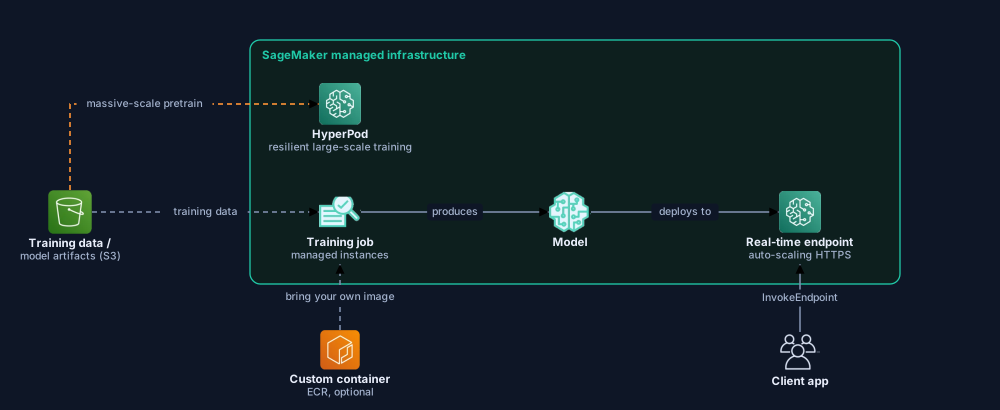
04 — Amazon SageMaker. Click to open full size
Cost shape
TrainingPer second, only while the job runs — the job tears itself down afterwards.
Real-time endpointPer instance-hour for as long as the endpoint exists, traffic or not.
The managed premiumSageMaker instance rates sit meaningfully above the equivalent raw EC2 instance.
Per-second training billing is the good part. An occasional job costs nothing between runs, where an idle EKS GPU node keeps billing around the clock.
The serving side is where this goes wrong. A forgotten real-time endpoint bills indefinitely, it does not appear in any dashboard as a problem, and nothing about it looks unusual until someone reads the line item. For intermittent traffic, reach for serverless or asynchronous inference rather than an endpoint that is permanently on.
Component reference
Training data / model artifacts (S3)
SageMaker reads and writes almost everything through S3. Inputs, checkpoints, and final model artifacts.
Custom container (ECR, optional)
SageMaker ships built-in framework containers for PyTorch, TensorFlow, and HuggingFace, but you can bring your own.
Training job (managed instances)
You submit a job spec. Instance type/count, hyperparameters, data location. And SageMaker provisions the compute, runs it, and tears it down automatically. You never see the EC2 or Kubernetes layer underneath.
HyperPod
Built for large-scale, long-running, fault-tolerant training. It detects and replaces failed nodes mid-run without restarting the whole job. AWS's answer to "train for weeks without one bad GPU node destroying the entire run."
Real-time endpoint
A managed, auto-scaling HTTPS endpoint that SageMaker provisions on its own. The serving equivalent of what's built by hand with vLLM on EKS in architecture 02.
Pick this if you want managed training and serving without building Kubernetes expertise in-house. You pay for that in flexibility: less control over the serving runtime than self-hosted vLLM on EKS gives you.
Hybrid · Architecture 05
Hybrid: Bedrock + self-hosted
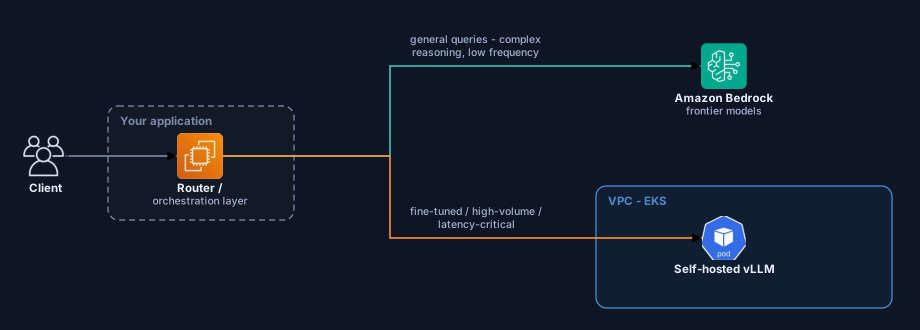
What most mature setups converge on. General capability comes from Bedrock, and self-hosting is reserved for the one slice of traffic where it pays for itself.
05 — Hybrid: Bedrock + self-hosted. Click to open full size
Cost shape
Billing modelPer-token for the Bedrock path, per GPU-hour for the self-hosted path.
Why it worksThe GPU floor is paid only for the traffic segment that keeps it busy; everything else stays elastic.
Once volume is real this is usually the cheapest total, and the reason is narrow: it fixes the utilization problem head-on. Point enough traffic at the GPU to keep it saturated, and send the long tail of rare, complicated requests to a per-token API.
You pay for that in a routing layer you now have to build, test and monitor. One more component that can be wrong at three in the morning.
Component reference
Router / orchestration layer
An application-level layer that decides, per request, which backend to call. Anything from a simple if/else to a more deliberate router based on query type, cost, or latency.
Bedrock (general queries)
Routed here when the quality of a frontier model is worth the per-token cost: complex reasoning, edge cases, low-frequency traffic.
Self-hosted vLLM (EKS)
Routed here when self-hosting wins outright: a fine-tuned model is required, volume is high enough that token cost would dominate spend, or there's a hard latency requirement.
Where teams end up. Most start on pure Bedrock, find the one traffic segment where self-hosting pays for its operational cost, and keep Bedrock for everything else.
Comparison: when to use what
The same five architectures, side by side. There is no universally "best" option here — only the trade-off that matches a given situation.
Architecture
Cost model
Operational burden
Control
Data residency
Best for
01 Bedrock
Per token; scales to zero when idle
Minimal. AWS manages everything
Low. You select a model, not modify it
Inside your AWS account, no third-party training
Most "add an AI feature" cases
02 Self-hosted inference
Fixed per GPU-hour; only wins at high utilization
High. You own the serving stack
Full. Fine-tuning, quantization, custom runtime
Full, stays in your VPC
High volume, fine-tuned model, strict compliance
03 Distributed training
Per GPU-hour across every node; five figures per run is normal
Very high. EFA, checkpointing, fault tolerance by hand
Complete. Your own model from scratch
Full
Pretraining or a large fine-tune of your own model
04 SageMaker
Per second while training; per hour while an endpoint exists
Medium. AWS manages instances, you write the job
Medium. Managed, but you set hyperparameters and containers
Inside your AWS account
Training without EKS/Kubernetes expertise in-house
05 Hybrid
Both, split by route. Usually the lowest total at real volume
Depends on the mix, plus the router itself
Highest flexibility
Split by route
Teams that want both quality and cost control
Cost figures throughout this post are indicative on-demand rates intended for order-of-magnitude comparison, not quotes. They vary by region, instance family, and commitment, and they change often — price your own volume against the current AWS pricing pages before deciding.
Sources
Every claim about how a service behaves is taken from AWS's own documentation. Pricing pages change often — check them against your own Region and volume before making a decision.
Amazon Bedrock — Data protectionModel Deployment Accounts; model providers have no access to Bedrock logs or to customer prompts and completions.
Last verified against AWS documentation on 4 August 2026.
Most teams don't pick one of these and stay there. They start with a managed API, and move down this list only when a specific cost, latency, or compliance constraint actually forces it. The mistake we see most often is skipping straight to self-hosted inference or a training cluster before that constraint exists — and paying a fixed GPU bill for capacity nobody is using yet.
This is the same territory our AI Infrastructure & MCP Servers work covers — landing zones for Bedrock and Azure OpenAI, cost-optimized GPU compute when self-hosting is genuinely the right call, and RAG pipelines wired in either way.